Introduction
vgn0_Introduction.RmdIntroduction
This vignette demonstrates the main workflow of the growthTrendR package for manipulating, analyzing, and visualizing tree-ring data and model performance.
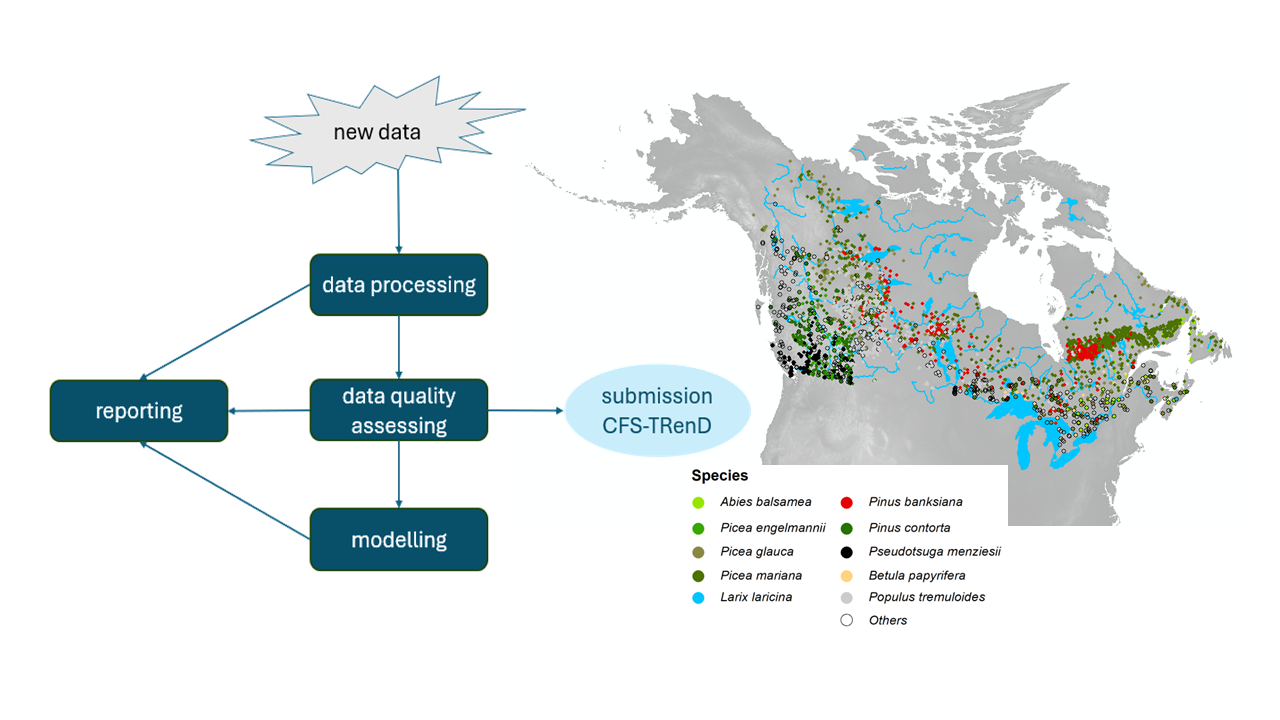
The workflow includes:
Data loading, to import raw measurements and prepare them for analysis.
Data processing, which organizes and formats the data for subsequent steps.
Quality assessment, ensuring the reliability and consistency of the measurements.
Modeling, where growth trends and patterns are analyzed.
As illustrated in the following diagram, visual inspection is provided at each step to facilitate assessment of data quality and validation of results.
Installation
The stable release of growthTrendR is available from
CRAN, while the latest development version is available from the GitHub
repository. The recommended GitHub installation method uses the
pak package to automatically resolve and install package
dependencies. An alternative manual installation approach is provided
for users who encounter dependency or network-related issues.
Install the CRAN release
install.packages("growthTrendR")Method 1 (recommended): Install the latest GitHub version using
pak
# Install pak if needed
install.packages("pak")

# Recommended settings for slower network connections
options(
  download.file.method = "libcurl",
  url.method = "libcurl",
  timeout = 3000
)

pak::pkg_install(
  "CFS-treering/growthTrendR",
  dependencies = c("Imports", "Suggests")
)
Method 2 (alternative): Manually install dependencies
If some dependencies are not installed automatically, they can be installed manually before installing the GitHub version of growthTrendR.
pkg.imports <- c(
  "data.table", "stringr", "stats", "mgcv", "ggplot2", "nlme",
  "patchwork", "terra", "sf", "raster", "furrr", "future",
  "htmltools", "curl", "dplyr")

pkg.suggests <- c(
  "knitr", "geosphere", "ggeffects", "ggforce", "gstat", "scales",
  "purrr", "parallel", "MuMIn", "rmarkdown", "rstudioapi", "MASS",
  "sp", "spdep", "magick", "gt", "kableExtra", "httr",
  "gridExtra", "rnaturalearth")

install.packages(c(pkg.imports, pkg.suggests))

# Install growthTrendR from GitHub (latest version)
pak::pkg_install("CFS-treering/growthTrendR")